
How Do I Split a Transaction Between Categories?
Mihkel Vetemaa
Updated
When you want to split a transaction into several categories, then we suggest the following steps.
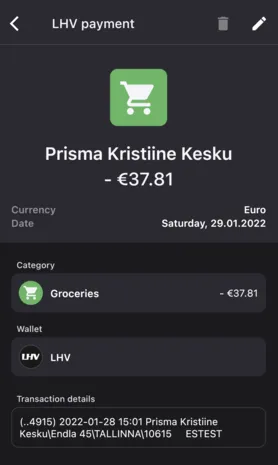
- Choose the transaction you want to split and tap on the edit icon.
- Tap on the “Split transaction” button.
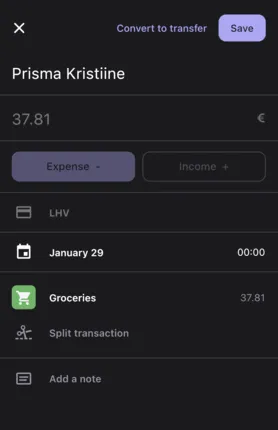
- Choose the category where you want to add to the transaction.
- You need to add a corresponding sum to the category you have added. It will be automatically deducted from the original transaction sum.
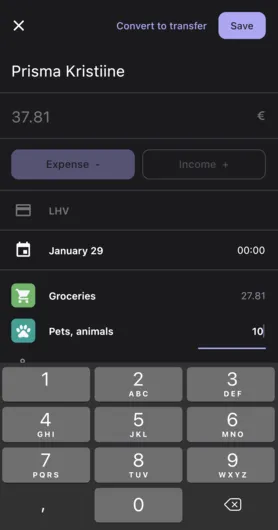
- You can add as many categories as needed.
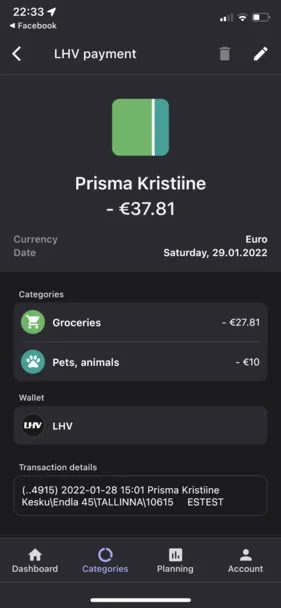
- Press Save
 To Exclude Part of a Transaction (Split Between Categories)
- Select the transaction you want to edit.
- Tap the edit button in the top-right corner of the screen.
- Choose “Split Between Categories”.
- Scroll to the bottom of the category list or use the search function to select “Excluded”
- Tap Save. This allows you to manage splits while excluding only the portion you want to remove from analytics.
New to Bilance?
Connect your banks and let the app do the categorizing — set up in about 2 minutes.