
How can I create a manual transaction?
Mihkel Vetemaa
Updated
You can create manual transactions when necessary.
-
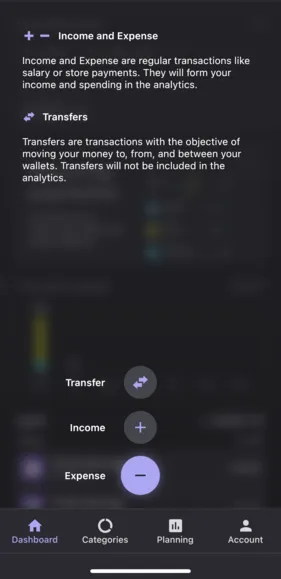
In the Dashboard view, tap Purple plus button. Then select the type of transaction: Expense, Income or Transfer. See this article to learn more about Transaction Types.
-
Tapping the purple plus enables creating manual transactions.
-
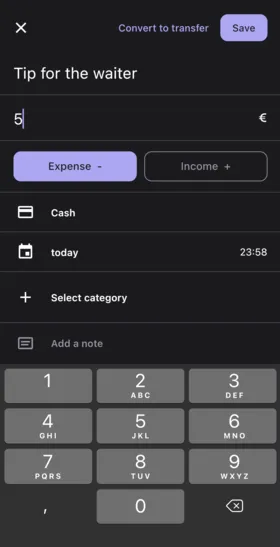
Enter the Transaction Title, then the Amount value.
-
Choose your wallet. Learn more about Wallets.
-
Tap on the today to change the transaction date.
-
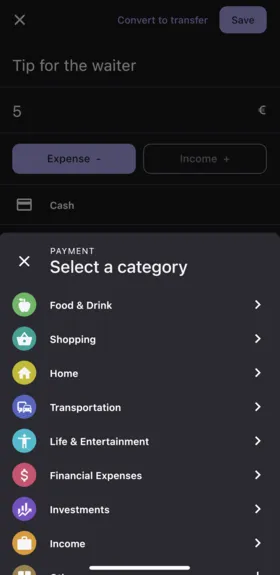
Tap the Select category to choose category for your transaction. You can also add a note.
-
Then press Save.

-
This is an example of a manual Income transaction, which could be used if you receive a cash payment.

-
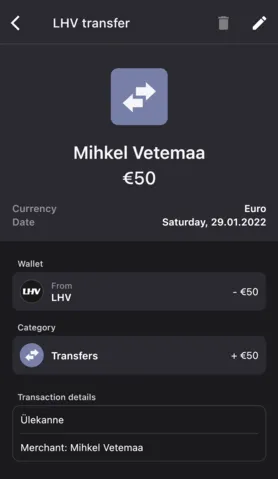
This is an example of a manual Internal Transfer, which could be used for transferring funds between your manual accounts. You need to choose the from wallet where the funds are coming from and the to walletwhere the funds are transferred.
New to Bilance?
Connect your banks and let the app do the categorizing — set up in about 2 minutes.